ClipboardManager Plus keeps text, images and screenshots, searches your history, and holds snippets and paste-as-plain-text on hotkeys. Runs locally, no cloud and no sign-up.
One button collapses the panel and the list takes the whole window. Built-in sections you don't use can be switched off in Settings, so only what matters stays.
Category panel collapsed — history uses the full width
A clipboard manager that stays out of your way and does more than the built-in Win+V.
Every copy is saved automatically — text, pictures and screenshots. Your history survives a Windows restart.
Instant search across the whole history, folders for clips, and pinning what matters to the top. The category panel collapses, and sections you don't need can be hidden in Settings.
Frequent addresses, details and phrases on Ctrl+Shift+Alt+S. Groups and variables in Pro.
Strip formatting with Ctrl+Shift+Alt+U and apply text transformations on paste.
Area, active window or full screen on PrtScr. Arrows, text and blur right in the overlay.
Runs quietly in the system tray and starts with Windows. Light and dark themes, localized into 8 languages.
ClipboardManager Plus and the built-in Windows clipboard (Win+V).
| Feature | ClipboardManager Plus | Win+V (built-in) |
|---|---|---|
| Text history | ✓ | ✓ |
| Image and screenshot history | ✓ | — |
| Snippets and variables | ✓ | — |
| Paste as plain text and transformations | ✓ | partial |
| Screenshots with annotation editor | ✓ | — |
| Categories, pinning, trash | ✓ | — |
| Windows 11 dark theme | ✓ | ✓ |
| Local data, works offline | ✓ | ✓ |
| Price | Free, Pro by key | Built in |
The core app is free forever. Pro is unlocked by a key — one payment, no subscription.
lifetime, no sign-up
perpetual licence for one user
The first 14 days of Pro work without a key: download the app and try every feature. After that it stays in Free mode until you enter a key.
Version 1.3.7 · Windows 10/11 (x64) · starts as the free edition
DC854862FD91D418F2DB0CE4F4133C7FC195989DB4D7CEA75308F651F2C02286CEFEB68017FC683C0F5F727EA75B99D3A8C9B30E40F6AFE8B82AB708687E4942SHA-256 to verify file integrity. Your antivirus may warn: the installer is not code-signed yet. Install steps are on the download page.
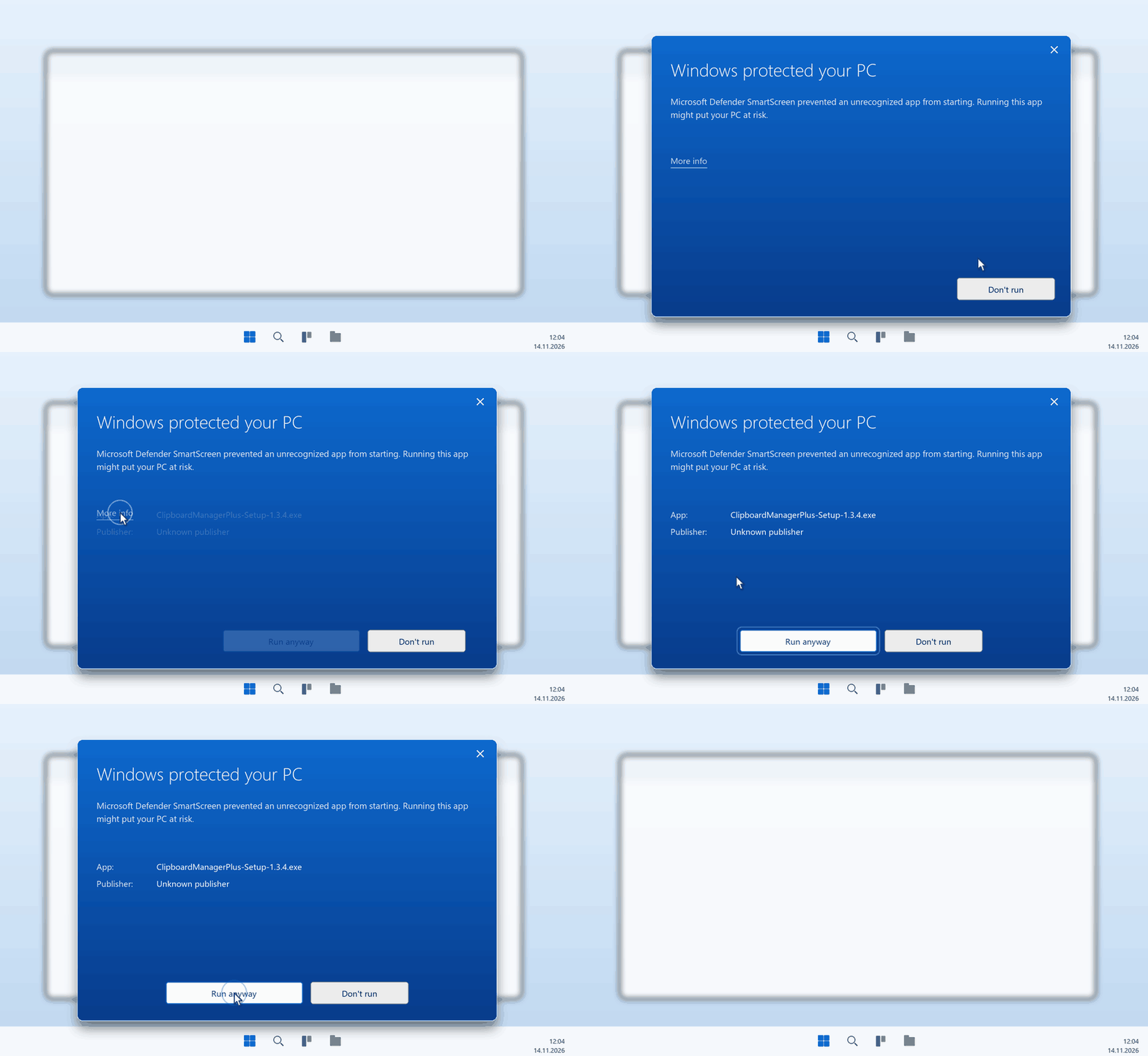
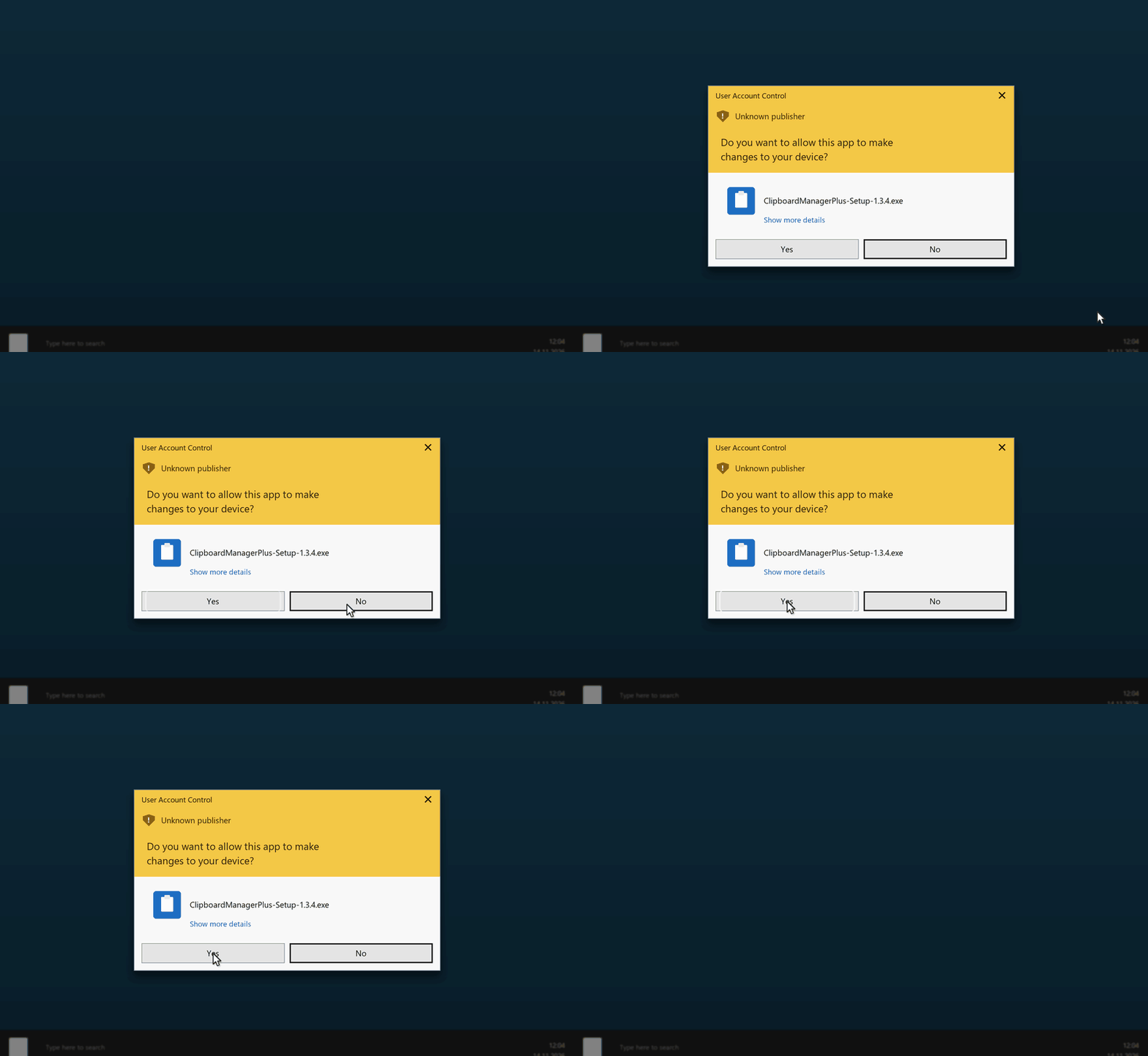
The installer is not code-signed yet, so Windows may call the publisher unknown. It is not a virus: the file comes from this site and its SHA-256 is listed above. Click “More info” → “Run anyway” on Windows 11, or “Yes” in the UAC prompt on Windows 10.
Yes. Free has no time limit: history, search, categories, images, screenshots, dark theme and 8 languages. No sign-up required.
Pro adds snippets and templates with groups, variable substitution, advanced import and export, text transformations on paste and priority support.
Pro is enabled for the first 14 days automatically — no key needed. When the trial ends the app switches to Free and keeps your history and settings.
Open Settings → Activation, paste the key and click Activate. The licence covers one user, is not tied to a specific computer, and works offline without contacting a server.
Press Ctrl+Shift+Alt+U — ClipboardManager Plus takes the current clipboard and pastes it as clean text, without fonts, colors or links.
Locally, in a database file on your computer. The app never sends clipboard content anywhere and works without internet.
Windows 10 and Windows 11, 64-bit editions. The app is native, without Electron or background services.